Saturday, February 25, 2012

Final Glitter and Doom Cover

This is the final image.  My husband is a huge Tom Waits fan and he took some great shots at his Glitter and Doom show in Dublin so I knew immediately this would be my starting point.

I cropped the image so I could add some text around the outside and began layering on the different text elements.

The Doom letters at the bottom I created by watching the tutorial that I posted in our discussion,  The flame texture was created by http://shaedsofgrey.deviantart.com/art/fire-45734782.
I used several different layer blend modes and added some clouds to enhance the smoke.

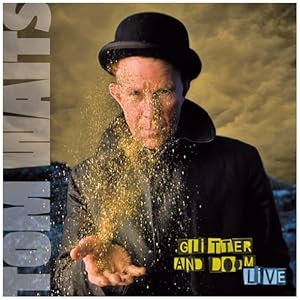
Tom Waits, Glitter & Doom

Original Glitter and Doom Cover


This what I have so far.  I have to make doom vertical and place it in the other image.

Friday, February 17, 2012

Portrait recreation

Original Glitter and Doom Cover
Image I took of my husband which I placed into Ai.
This is the vector image I created in Ai.
After pulling the vector into Ps, I used the brush tool (mostly 1-5 point lines) to add color and texture back into the image.
This is the "final" image.  Given more time I would have gone back to my original rough sketch and added more shadow to the forehead but overall I was happy with the stylized illustration that I created and I think with some refinement I could use it as an animation.  I use a mouse for all of my drawing which I find very cumbersome and I wonder if I should look for a drawing tablet instead.


Burning Newspapers

This is a photo I took of a stack of newspapers.  I pulled it into Photoshop and added this flame technique that I learned on Youtube. http://youtu.be/qr6s_gj8a-Y. It was difficult for me to replicate the same color burn effect to get the red so I used levels instead.